

All articles
Building Products / 8 minutes read
How I Use MCP to Turn Product Feedback Into Development Tasks
September 17, 2026
Customer feedback usually ends up in one place, while the actual development work happens somewhere else.
A user reports a problem. Someone needs to read it, understand it, turn it into a development task, find the relevant code, make the change, and eventually tell the user that it has been fixed.
That process involves a lot of context switching.
With Suggix MCP, an AI coding agent can work directly with your product feedback. Instead of manually copying feedback from your product management tool into your coding environment, the agent can read the feedback, inspect its content, make code changes, update the feedback status, and even publish release notes.
In this post, I'll walk through a real example using DeepFocus and Antigravity.
The entire workflow looks like this:
Feedback → Understand → Code → Update Status → Release Notes
What is Suggix MCP?
Suggix MCP is a remote Model Context Protocol (MCP) server that connects AI clients to your Suggix workspace.
MCP allows AI applications to discover and invoke tools exposed by an external service. In the case of Suggix, those tools give an AI agent access to product feedback, roadmap items, changelogs, and other workspace context.
Suggix provides a remote MCP endpoint, so there is no local MCP server to install or maintain. You connect an MCP-compatible client, authenticate with your Suggix MCP key, and the agent can work with your workspace.
For this example, I'm using Google Antigravity, which supports MCP connections to external APIs and tools.
The Example: DeepFocus
To make this more concrete, let's use DeepFocus as an example.
Imagine a user submits a feature request or bug report through the DeepFocus feedback portal.
Normally, the workflow might look something like this:
- Find the feedback in your feedback tool.
- Read and understand the request.
- Copy the relevant information into your coding environment.
- Find the relevant code.
- Implement the change.
- Go back to the feedback tool.
- Update the status.
- Write a release note.
With Suggix MCP, most of these steps can happen directly through the AI coding agent.
1. Configure Suggix MCP in Antigravity
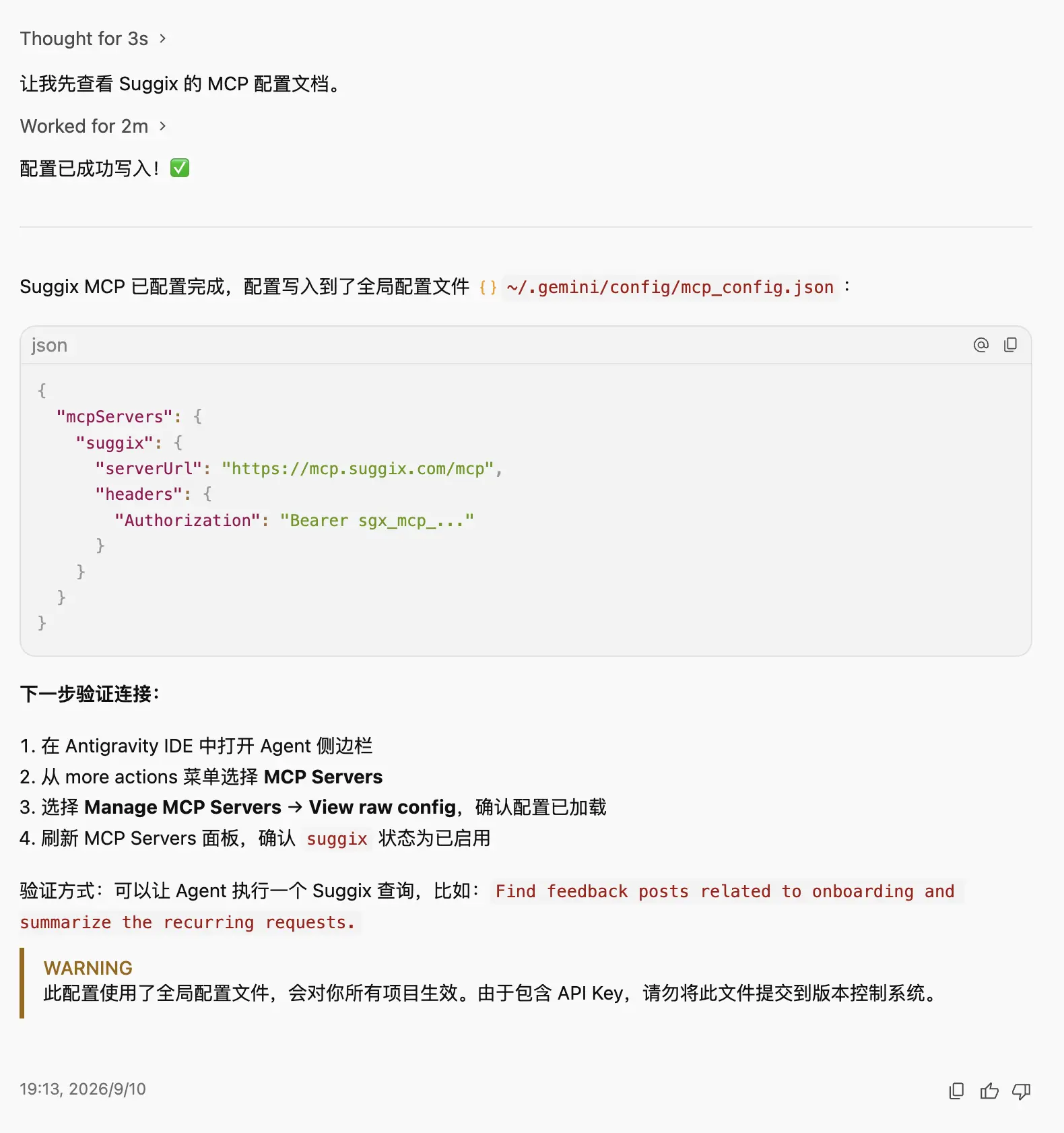
The first step is connecting Suggix to Antigravity.
After creating an MCP key in Suggix, configure the Suggix MCP server in your Antigravity environment.
The Suggix MCP endpoint is:
Authentication uses a Bearer token containing your Suggix MCP key.
Once the connection is configured, Antigravity can discover the tools provided by Suggix.
For detailed instructions on creating an MCP API key and configuring Suggix MCP in Antigravity, see the Suggix MCP documentation.
At this point, you don't need to manually export feedback, copy API responses, or build a custom integration between your coding environment and Suggix.
The AI agent can access the workspace through MCP.
2. Ask the Agent to List Feedback
Once the connection is ready, you can start interacting with your Suggix workspace using natural language.
For example, you can ask Antigravity to list the feedback items in the DeepFocus workspace.
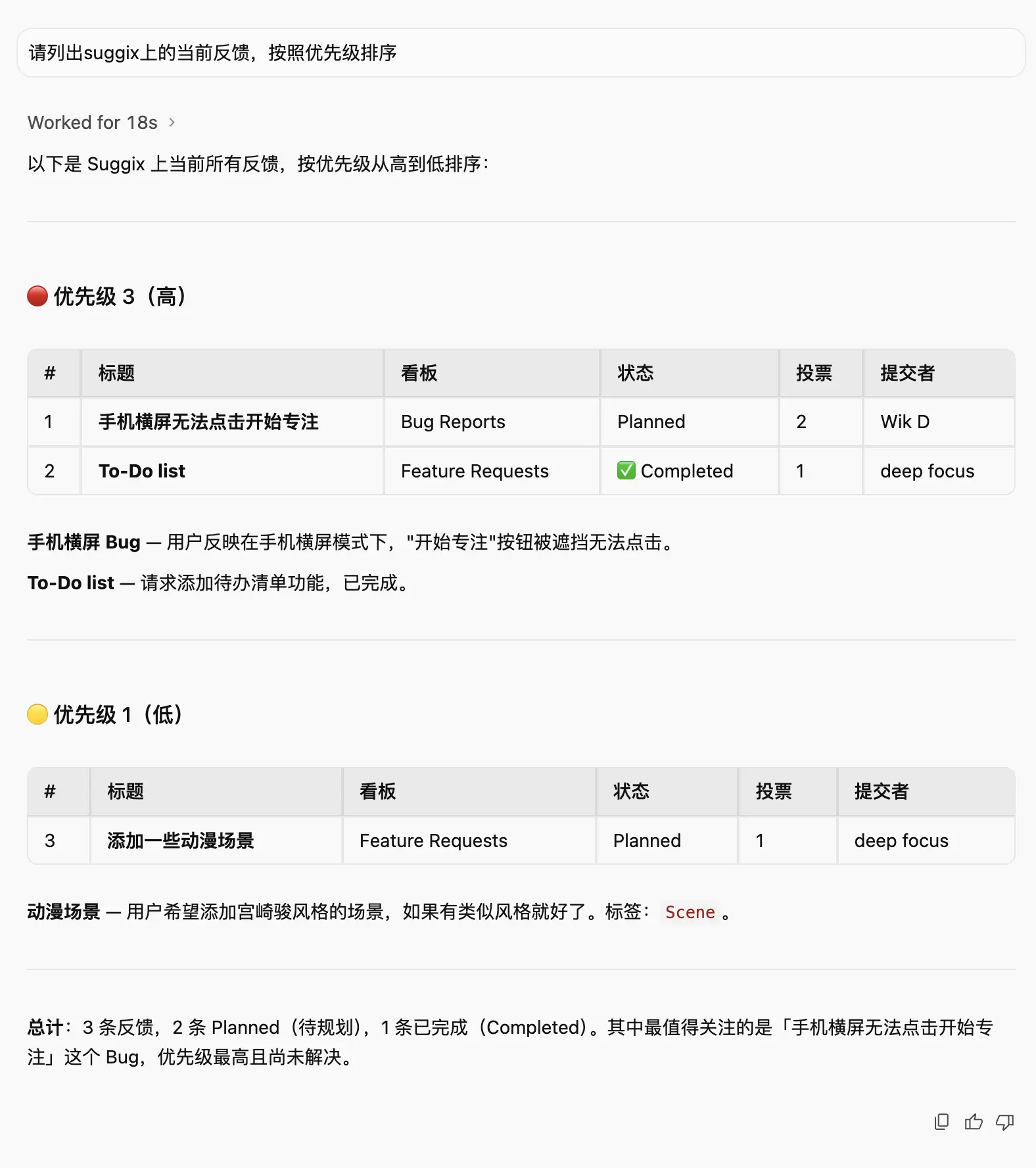
The important part here is that the agent isn't simply reading a static document.
It is interacting with Suggix through MCP tools.
Suggix MCP provides tools for listing, inspecting, creating, and updating feedback. The agent can also use workspace context such as boards, statuses, tags, and other configuration when working with the data.
This means your product feedback becomes accessible from the same environment where you are already writing code.
3. Query the Feedback Content
Listing feedback is only the beginning.
Once the agent finds a relevant item, it can retrieve the actual feedback content and use it as context for the development task.
For example, the agent can inspect a specific DeepFocus request and understand what the user is asking for.
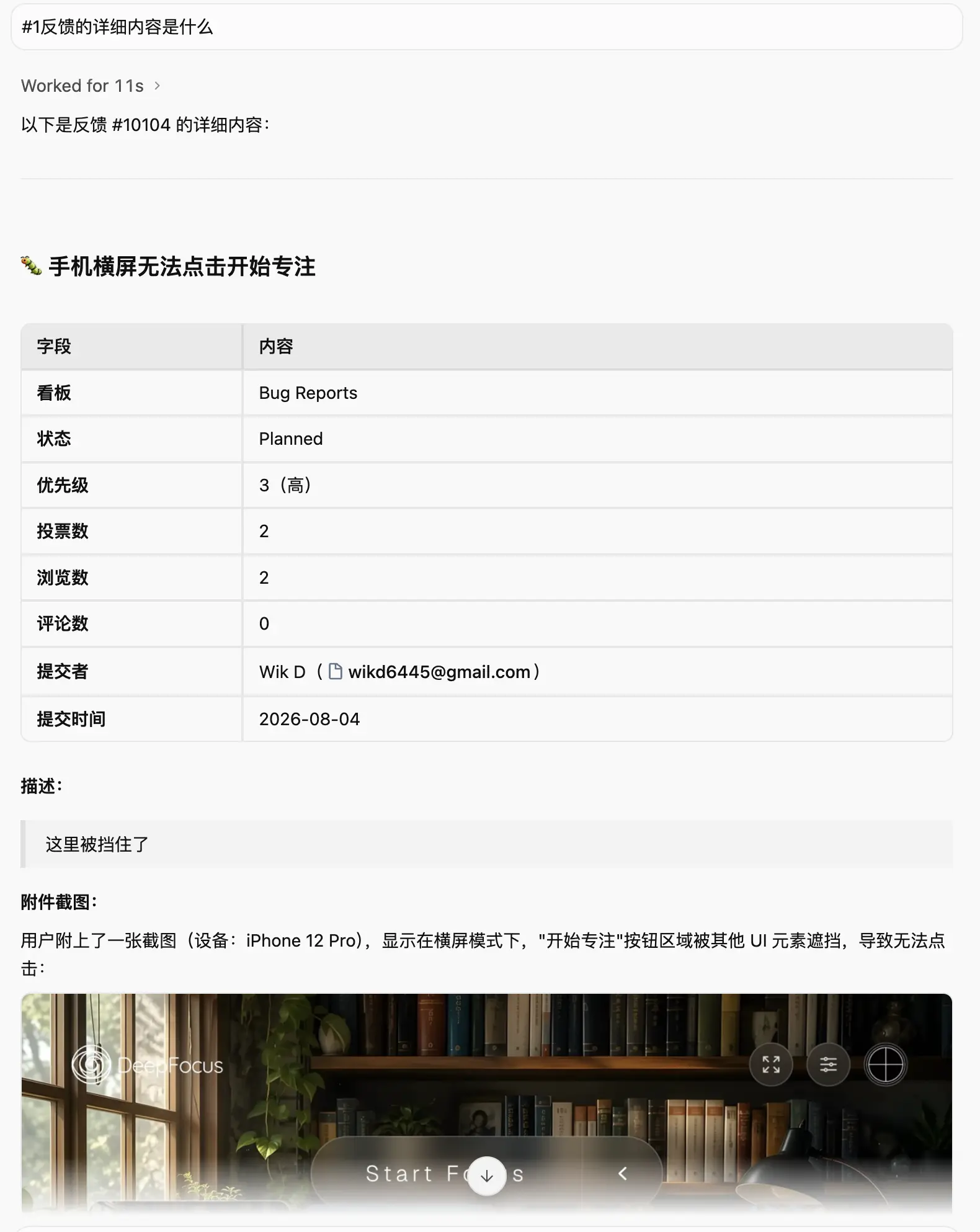
This is where the workflow starts to become more interesting.
Instead of telling the AI:
"A user reported this problem. Here is the description I copied from Suggix."
you can simply tell the agent to investigate the feedback itself.
The feedback becomes part of the agent's working context.
4. Modify the Code Based on the Feedback
After understanding the request, the next step is to work on the code.
This is where using an MCP-enabled coding agent becomes particularly useful.
Antigravity can take the feedback as a starting point, inspect the DeepFocus codebase, identify the relevant implementation, and make the required changes.
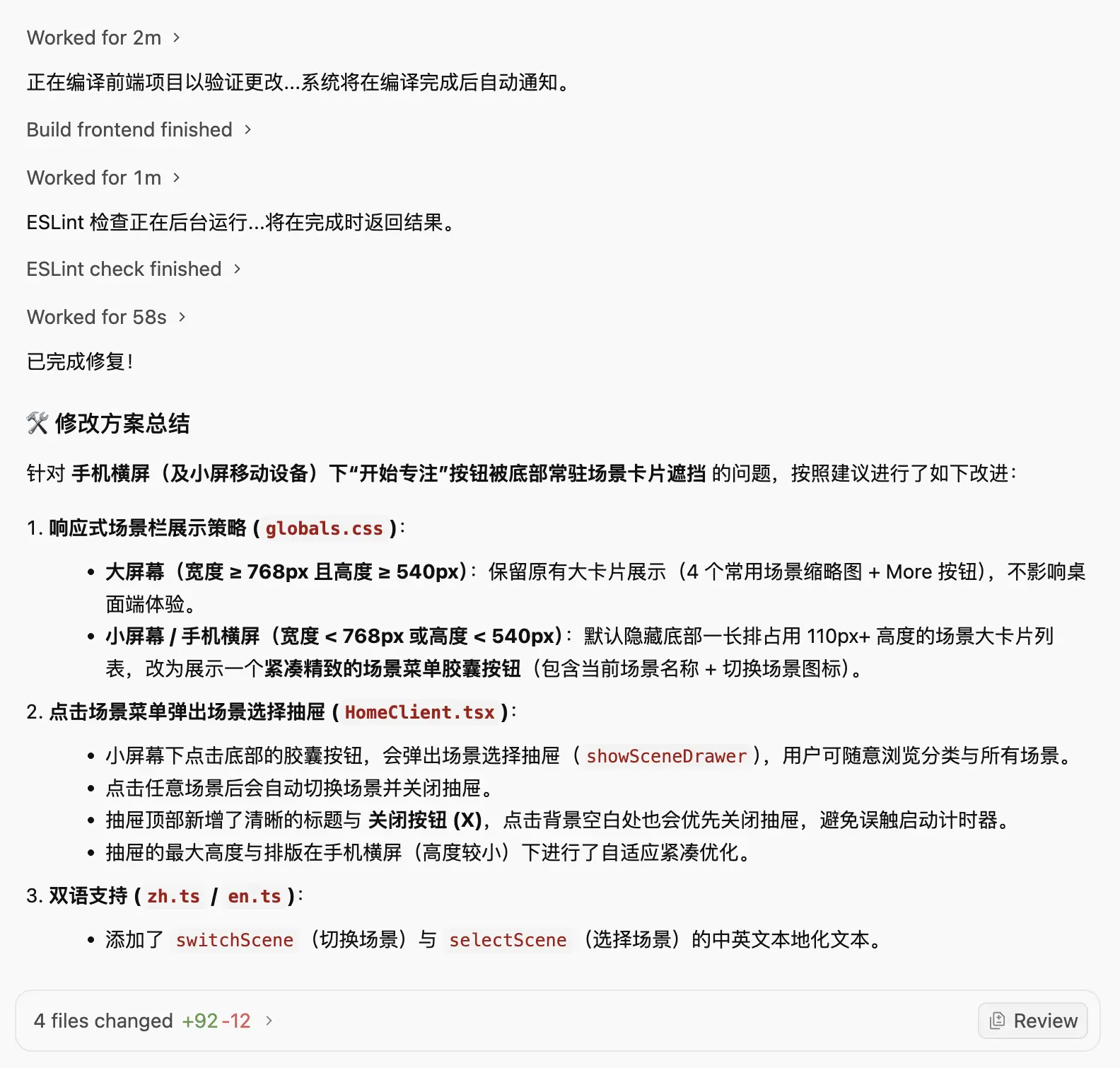
The important idea isn't that the AI can write code.
AI coding agents can already do that.
The interesting part is where the context comes from.
The product feedback that explains why the code needs to change can now be accessed directly from the same agent that works on the code.
This creates a much shorter path between:
"A user wants this"
and
"The code has been changed."
5. Update the Feedback Status
After the implementation is complete, there is still one important step: closing the loop.
Instead of opening Suggix separately and manually changing the feedback status, the agent can update the feedback through MCP.
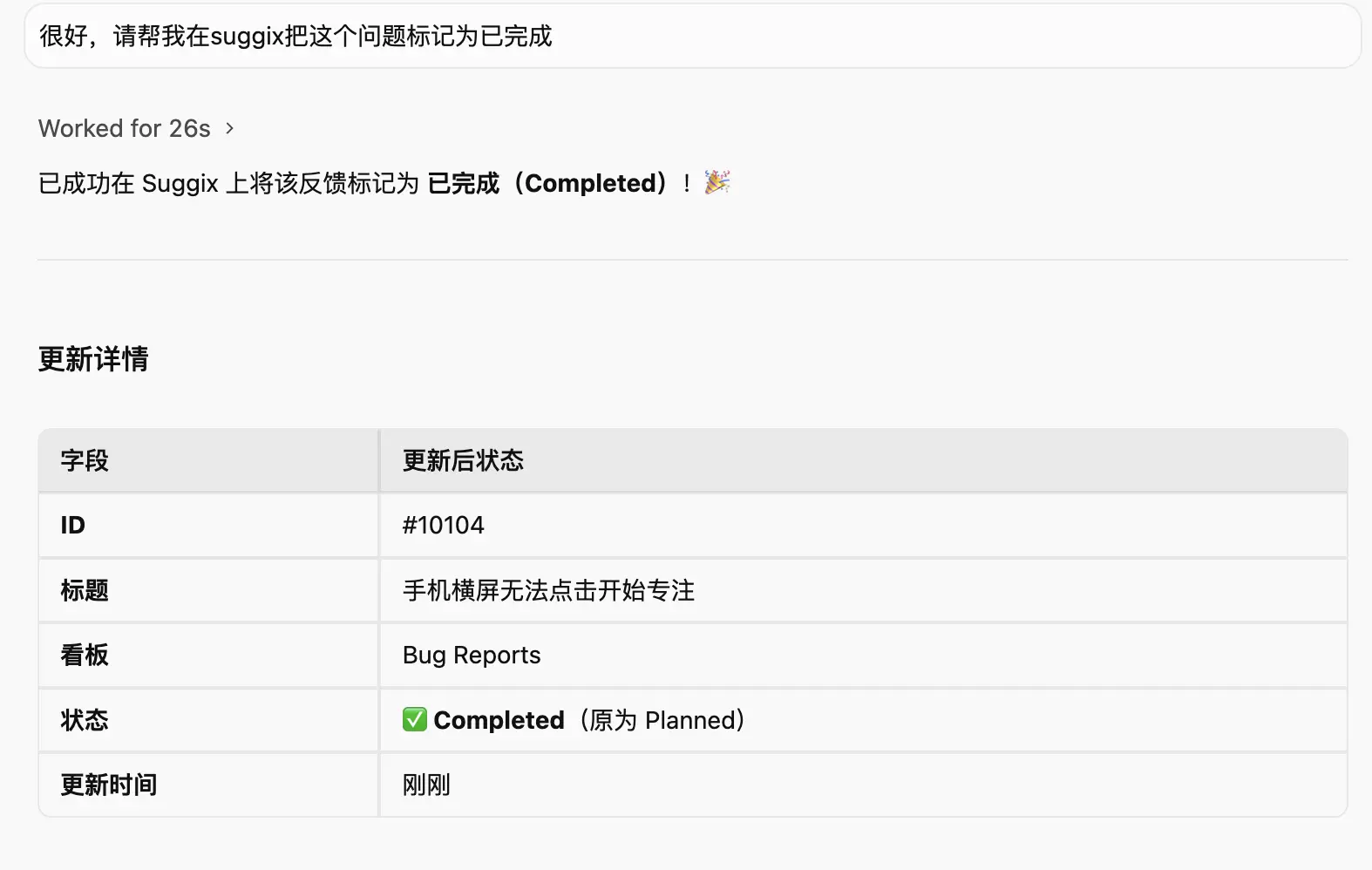
For example, after confirming that the requested change has been implemented, the feedback can be moved to the appropriate completed or shipped status.
This keeps the product feedback backlog synchronized with the actual development work.
It also means users can see that their request has progressed instead of leaving completed requests sitting in an old status.
6. Publish Release Notes
The final step is communicating what changed.
Once the work is finished, the same agent can create or update a Suggix changelog entry.
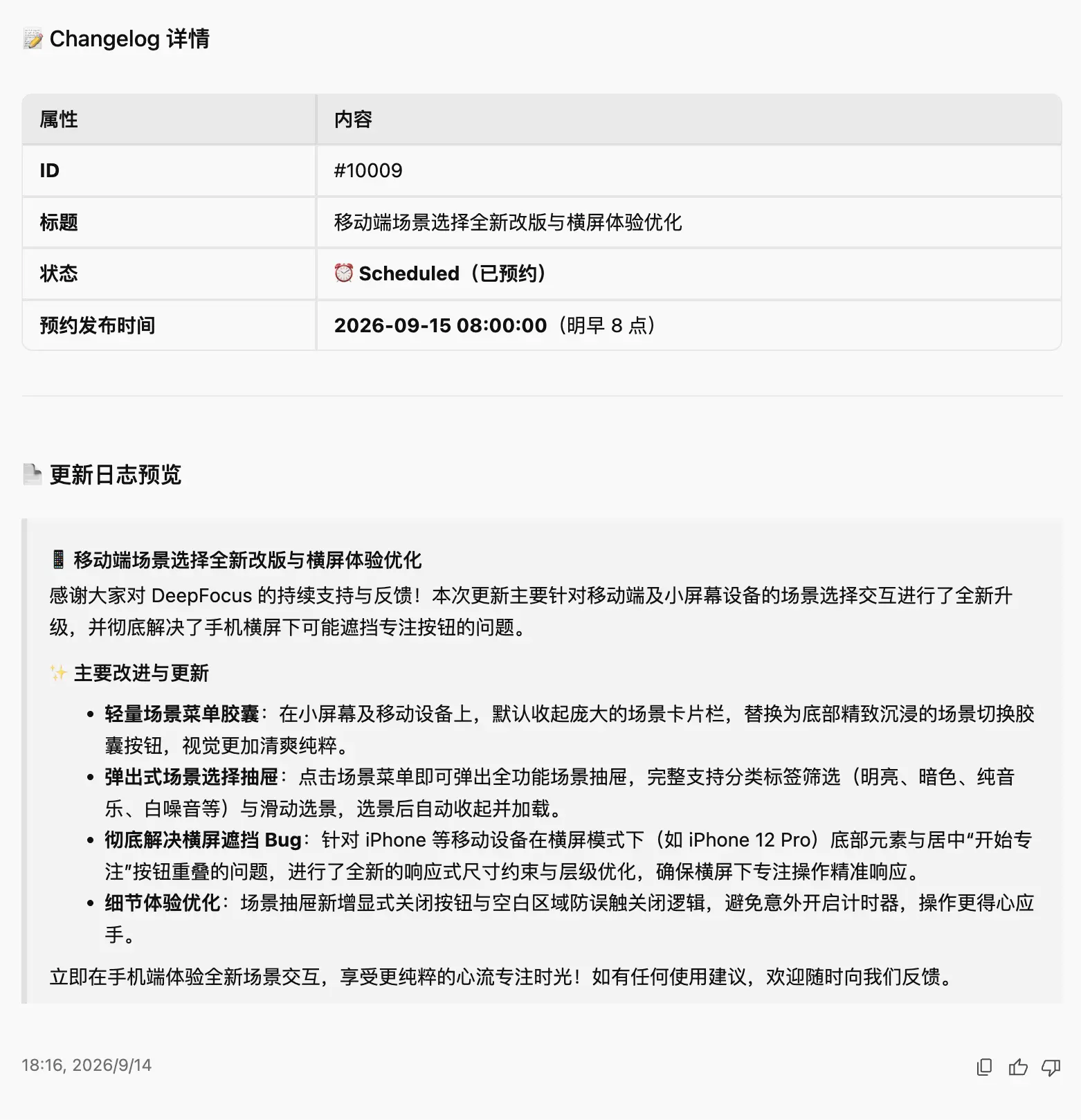
This closes the loop:
Customer feedback → Development → Status update → Release notes
Suggix MCP supports changelog operations alongside feedback and roadmap operations, so the agent can work with the product workflow instead of stopping at the code change.
You can then publish the release note through Suggix and communicate the update to your users.
The Complete Feedback-to-Code Loop
Putting everything together, the workflow looks like this:
Customer
↓
Submit feedback
↓
Suggix
↓
Antigravity + Suggix MCP
↓
Read feedback
↓
Understand the request
↓
Inspect code
↓
Modify code
↓
Update feedback status
↓
Create release notes
↓
Customer sees the update
The key difference is that the feedback system is no longer isolated from the development environment.
The AI agent can work across both sides of the workflow.
Why MCP Makes This Interesting
Traditional integrations usually connect two specific systems.
For example:
Feedback tool → GitHub
or
Feedback tool → Slack
These integrations can be useful, but each new workflow usually requires another integration to be built and maintained.
MCP takes a different approach.
Instead of building a custom integration for every AI client, Suggix exposes its capabilities through a standard protocol. Compatible AI clients can discover and use those tools.
That means the same Suggix workspace can be accessed by different AI clients that support MCP.
Today that might be Antigravity. It could also be another MCP-compatible coding agent or AI assistant.
Suggix currently supports MCP connections for clients including Claude Code, ChatGPT/Codex, Cursor, and Antigravity.
From Feedback Management to AI-Assisted Product Development
The bigger idea behind Suggix MCP is not simply "manage feedback with AI."
It's about connecting customer context with development context.
A typical product development loop looks like this:
Users
↓
Feedback
↓
Product decisions
↓
Development
↓
Release
↓
Users
MCP allows an AI agent to participate in more parts of that loop.
The agent can retrieve the original customer request, understand the product context, work with the codebase, and update the product management system when the work is complete.
That reduces the amount of manual context switching between your feedback system and your development environment.
What You Can Try Next
Once Suggix MCP is connected, you don't have to limit the workflow to individual feedback items.
For example, you can ask your AI agent to:
- Find new feedback from this week.
- Identify frequently requested features.
- Inspect a specific customer request.
- Create a new feedback item.
- Update feedback status or priority.
- Review roadmap items.
- Move roadmap items between statuses.
- Create a changelog from recently completed work.
- Publish a release note for a shipped feature.
These operations are available through Suggix's MCP tools across feedback, roadmap, changelog, comments, users, and workspace context.
The result is a workflow where product feedback isn't just something you collect.
It becomes context that your AI development agent can actually use.
Final Thoughts
For a small SaaS team or an indie developer, the distance between customer feedback and implementation can be surprisingly large.
You don't necessarily need another dashboard, another notification, or another integration.
Sometimes the useful thing is simply giving your AI coding agent access to the context it needs.
With Suggix MCP, the workflow can look like this:
Collect feedback → Ask your agent → Build → Update → Ship
And in the DeepFocus example, the entire process can be driven from Antigravity without manually copying feedback from one system into another.
If you're already using an MCP-compatible AI coding agent, connecting it to your product feedback workflow is worth trying.
Build what users love, together
Collect feedback, prioritize features, and keep your roadmap aligned with what actually matters.
Get Started — It’s FreeNo credit card required · 14-day free trial · Setup in minutes