

All articles
Comparisons / 6 minutes read
Why Using Trello as a Public Roadmap Fails in 2026 (And What to Use Instead)
November 5, 2026

Using a trello public roadmap is a common rite of passage for early-stage software companies aiming to project transparency, but generic Kanban boards quickly become unmanageable as user volume scales. Because Trello was designed as internal task management software rather than a product communication engine, it lacks customer upvoting, automated status change notifications, and native changelog broadcasts. If your product has outgrown static Trello boards, Suggix provides the purpose-built public roadmap and feedback-to-changelog loop needed to turn user suggestions into customer retention. This guide examines the 5 critical failure modes of public Trello boards and presents a 5-minute migration blueprint to a modern PLG roadmap in 2026.
The Accidental Public Roadmap: Why Everyone Starts with Trello
When early-stage founders decide to build in public, Trello is almost universally the first tool they reach for. It is free, familiar, and requires zero technical configuration: create three columns (Planned, In Progress, Shipped), add a few task cards, flip board visibility from 'Workspace' to 'Public', and share the link on Twitter or Product Hunt.
In the first month, this setup appears sufficient. However, as web traffic grows from 50 visitors to 5,000 monthly active users, treating internal task management software as a public communication bridge introduces severe friction points.
User Feedback Collection: Centralizes customer requests across channels into structured boards.
Feature Voting: Enables one-click upvotes with revenue attribution to separate real signal from noise.
Interactive Public Roadmap: Aligns internal progress with customer expectations across flexible delivery horizons.
Product Changelog: Broadcasts release announcements and automatically notifies upvoters upon completion.
5 Critical Bottlenecks of Running a Public Roadmap on Trello
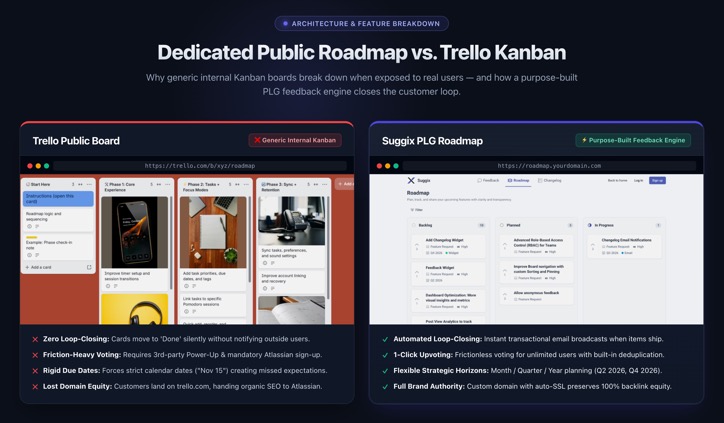
1. Zero Loop-Closing: No Automated Notifications When Cards Move to Done
The single most damaging failure of a Trello public roadmap is the total lack of feedback loop automation. When engineering moves a card from 'In Progress' to 'Done', Trello notifies nobody outside your internal team. Product managers must manually cross-reference support tickets and emails to let customers know their requested feature has shipped, wasting prime re-engagement opportunities.
2. The Spam & Duplication Disaster: No Native Upvote Mechanism
Trello has no built-in feedback deduplication or friction-free upvoting. To allow voting, administrators must install third-party Power-Ups that require every voter to register for an Atlassian account. If you enable public comments, comment sections quickly drown in spam links or repetitive duplicate requests.
3. Domain & Branding Limits: Stuck on a Generic Trello URL
Directing valuable prospective customers to
trello.com/b/xyz/roadmap sends organic backlink equity and brand authority straight to Atlassian. You cannot map custom domains (like roadmap.yourdomain.com), inject brand styling, or customize tab favicons on Trello.4. Disconnected Feedback: No Bridge Between User Requests and Roadmap Items
A genuine product-led roadmap is the middle stage of a continuous lifecycle: Feedback Collection → Voting & Triage → Roadmap Planning → Changelog Release. Trello boards are disconnected from customer intake; product managers must manually copy feedback from Zendesk, Intercom, or Slack into Trello cards.
5. Rigid Deadlines vs Flexible Horizons (Month/Quarter Planning)
Trello forces teams into strict calendar due dates (e.g., 'Due Nov 15'), setting unrealistic expectations that lead to customer frustration when engineering estimates shift. In contrast, modern PLG roadmap tools support flexible time horizons such as Q1, Q2, This Month, or Next Quarter.
Trello vs Suggix: Feature Comparison Table
Feature
Trello (Public Board)
Suggix (Public Roadmap)
Custom Domain
❌ No
✅ Yes (CNAME + ACM SSL)
Anonymous Upvoting
❌ Requires Atlassian Login
✅ One-click, no signup needed
Auto Notify on Ship
❌ Manual only
✅ Automated changelog notifications
Feedback → Roadmap Link
❌ Manual copy-paste
✅ Native feedback-to-card sync
Flexible Horizons
❌ Hard date deadlines only
✅ Q1/Q2/This Month/Next Quarter
Internal Private Notes
❌ No RBAC on public boards
✅ Granular RBAC
API / MCP Integration
❌ No MCP, limited REST
✅ Full MCP server + REST API
Trello vs Suggix: Full Feature Infographic
5-Minute Migration Blueprint: From Trello to Suggix
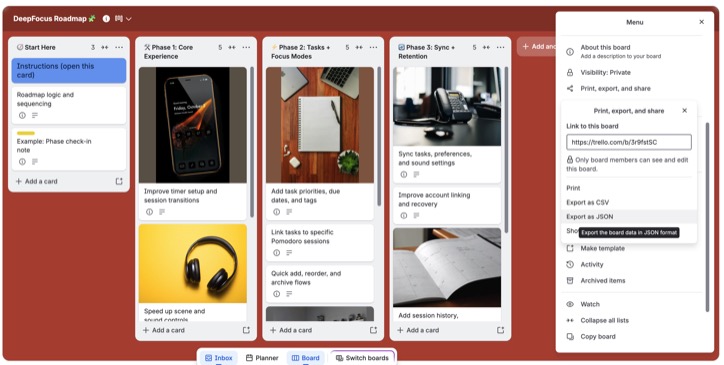
Step 1: Export Your Trello Board Data
In your Trello board, open the board menu by clicking Show Menu → More → Print and Export, then select Export as JSON (or CSV). This exports all of your lists, cards, descriptions, due dates, and checklist items into a structured raw backup.
Step 2: Initialize Your Suggix Workspace
Sign up on Suggix and create your new workspace. Provide your workspace brand name, define your primary brand accent color, and select your dedicated public subdomain (e.g.
yourproduct.suggix.com).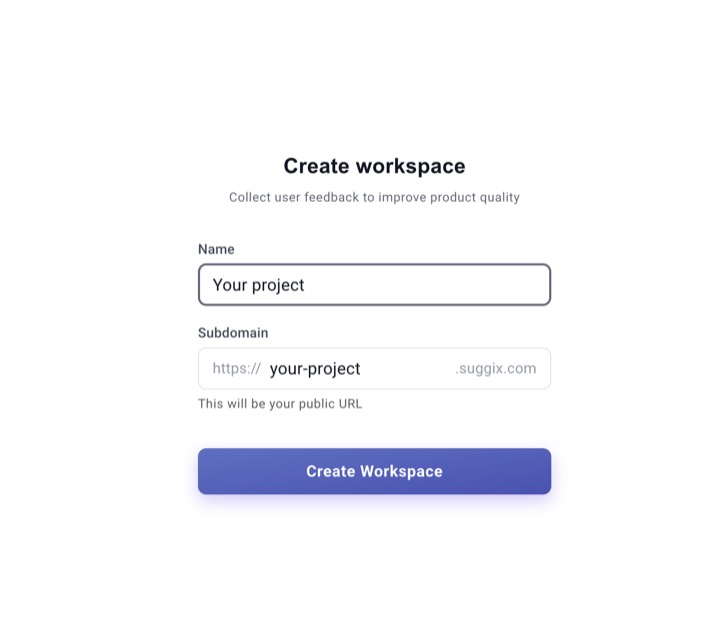
Step 3: Map Columns to Discrete Status Lifecycles
Map your former Trello lists directly to Suggix's 6 discrete status states (Backlog, Planned, In Progress, Completed, Closed). Cards placed in Planned and In Progress will automatically appear on your live public roadmap.
Step 4: Connect via Model Context Protocol (MCP) or REST API
Under Workspace Settings, navigate to Developer / API and generate your Model Context Protocol (MCP) authentication token (prefix
sgx_mcp_...). This lets your team or AI agents seamlessly synchronize feedback, update card lifecycles, and automate roadmap cards directly using the Suggix MCP server (https://mcp.suggix.com/mcp) or REST API.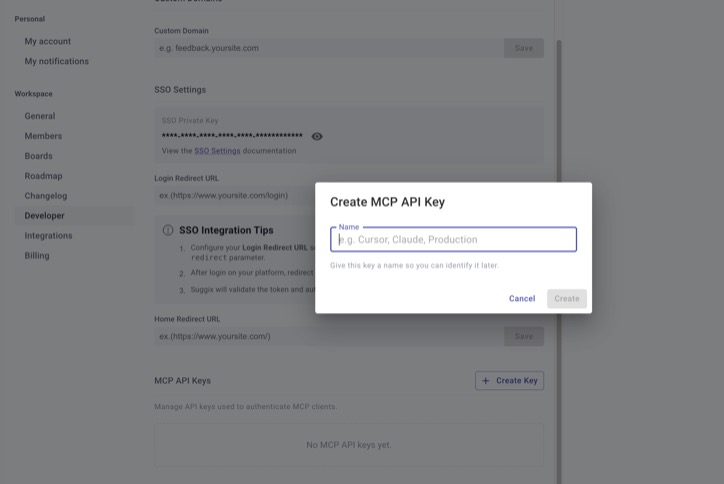
Step 5: Publish Your Custom Domain & Close the Feedback Loop
Point your custom CNAME record (e.g.
roadmap.yourdomain.com) to your Suggix subdomain for automated SSL certificate management handled via AWS Certificate Manager (ACM). Once live, every time you move a card to Completed, Suggix prompts you to publish a changelog announcement and automatically notifies every customer who upvoted the request.Frequently Asked Questions (FAQ)
Q: Can end users vote on a Trello board without an Atlassian account?
A: No. Trello does not support anonymous or tokenized voting. Any user wishing to vote or comment must sign up for an Atlassian account, creating severe participation drop-off compared to Suggix's one-click voting.
A: No. Trello does not support anonymous or tokenized voting. Any user wishing to vote or comment must sign up for an Atlassian account, creating severe participation drop-off compared to Suggix's one-click voting.
Q: How does Suggix synchronize feedback posts with the public roadmap?
A: Every roadmap card in Suggix is an actual user feedback post. When an administrator updates a post's status in the Dashboard (e.g. from Planned to In Progress), the card instantly shifts columns on the public roadmap in real time.
A: Every roadmap card in Suggix is an actual user feedback post. When an administrator updates a post's status in the Dashboard (e.g. from Planned to In Progress), the card instantly shifts columns on the public roadmap in real time.
Q: Can I keep internal engineering notes private on a public Suggix board?
A: Yes. Suggix provides granular Role-Based Access Control (RBAC). Team members can leave internal comments and assign owners without exposing internal conversations to public portal visitors.
A: Yes. Suggix provides granular Role-Based Access Control (RBAC). Team members can leave internal comments and assign owners without exposing internal conversations to public portal visitors.
Q: What are Suggix's pricing tiers for public roadmaps?
A: You can get started with Suggix completely free with no credit card required, including unlimited tracked end users. For advanced capabilities such as custom domain branding, additional team seats, and automated MCP/API integrations, explore full plan details and upgrades on the Suggix pricing page.
A: You can get started with Suggix completely free with no credit card required, including unlimited tracked end users. For advanced capabilities such as custom domain branding, additional team seats, and automated MCP/API integrations, explore full plan details and upgrades on the Suggix pricing page.
Build what users love, together
Collect feedback, prioritize features, and keep your roadmap aligned with what actually matters.
Get Started — It’s FreeNo credit card required · 14-day free trial · Setup in minutes