

In-App Feedback Widget
Embed Feedback, Roadmaps & Changelogs Directly in Your App
Start with Suggix WidgetOne embed for your complete feedback lifecycle
From collecting requests and running upvotes to announcing release notes, the Suggix widget handles your entire product feedback loop seamlessly.
In-App Upvoting
Empower users to vote on feature ideas directly within your application
1-Click Submissions
Capture bugs and suggestions the moment inspiration strikes with screenshots
Embedded Changelog
Deliver release notes, announcements, and fixes without sending mass emails
Seamless SSO Identity
Pre-authenticate users with JWT tokens so they never need to log in twice
Smart Auto-Hide
Slides out smoothly on scroll down and gracefully reappears on scroll up
Customizable Triggers
Use the floating launcher or trigger via any custom navigation button
Multi-Board Routing
Organize input across Feature Requests, Bug Reports, and Integrations
Ultra Lightweight
Less than 30kB bundle size with zero impact on page performance
How it works
From two-minute setup to active customer engagement and closed-loop release announcements.
Step 1
1. Install in less than 2 minutes
Simply copy the prompt into your AI agent (Cursor, Claude Code, Windsurf, Copilot, etc.) to integrate automatically, or check out our guide for manual NPM or script configuration.
AI Agent Prompt (Cursor, Claude, Windsurf, Copilot, Antigravity)
Please integrate the Suggix embeddable feedback and changelog widget into this project.

Instructions:
1. Inspect the project to determine its frontend framework (React, Next.js, Vue, Nuxt, or plain HTML):
   - For React / Next.js / Vite:
     - Run: npm install suggix-widget
     - Create a client-side component (e.g. components/SuggixWidget.tsx) and initialize Suggix:
       Suggix.init({
         workspace: '<YOUR_WORKSPACE>',
         position: 'bottom-right',
         defaultTab: 'feedback',
         autoHideOnScroll: true,
       });
     - Mount the component in the root layout or application shell.
   - For static HTML / Webflow / WordPress / Shopify:
     - Add this script before the closing </body> tag:
       <script src="https://unpkg.com/suggix-widget@latest/dist/widget.js" data-workspace="<YOUR_WORKSPACE>" data-position="bottom-right" defer></script>
2. Ensure the widget mounts cleanly without any SSR or build errors.
Paste this directly into your coding assistant to auto-integrate in seconds.
View Full Widget GuideStep 2
2. Collect feedback & bug reports in context
Users can report bugs, submit feature requests, select target boards (Feature Request, Bug Reports, Integrations), and attach up to 5 screenshots without leaving your application. (Try interacting with the live widget below!)
Workspace Overview
Real-time product metrics, live deployments, and in-app customer interactions.
Active Users
42,890
+14.2% this month
Feedback In-App
1,248
↑ 28% from widget
CSAT Rating
98.4%
High customer satisfaction
Recent Product Releases
v2.4.0 Production Deploy
MCP Authentication Server
Zapier Integration Webhook
Loading live Suggix widget...
Step 3
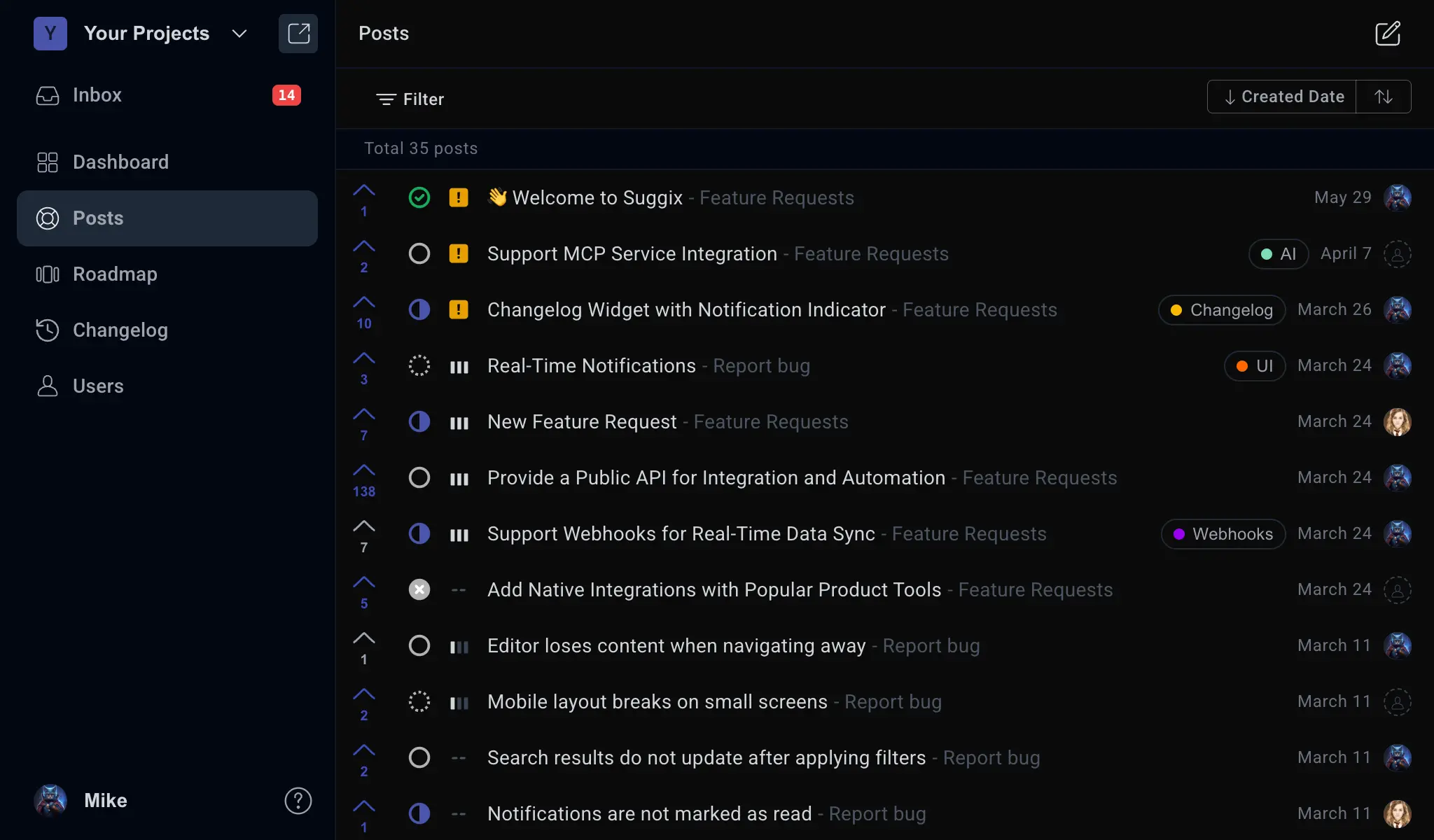
3. Manage, prioritize & organize feedback
All user suggestions flow directly into your centralized Suggix workspace. Filter by boards, assign statuses (Planned, In Progress, Completed), set priorities, and keep your roadmap aligned.

Step 4
4. Announce releases & close the loop in-app
Deliver product updates, release notes, and bug fixes directly inside your application via the widget changelog tab. Users can react with likes, read details, and know their voices were heard. (Try clicking like or read more in the live widget below!)
Workspace Overview
Real-time product metrics, live deployments, and in-app customer interactions.
Active Users
42,890
+14.2% this month
Feedback In-App
1,248
↑ 28% from widget
CSAT Rating
98.4%
High customer satisfaction
Recent Product Releases
v2.4.0 Production Deploy
MCP Authentication Server
Zapier Integration Webhook
Loading live Suggix widget...
“Embedding Suggix directly into our app was a game-changer. Our user feedback volume jumped by 400% because customers no longer had to leave what they were doing to report an issue or suggest a feature. And announcing changelogs right in the widget made feature adoption skyrocket.”
Marcus Vance
Head of Product · ScaleWave
Frequently Asked Questions
Everything you need to know about the Suggix In-App Widget
The Suggix Widget is an embeddable floating modal that brings your feedback board, submission form, and product changelog directly into your SaaS product or website. Users can browse requests, submit bug reports with screenshots, vote on ideas, and read release notes without opening new tabs or leaving your application.
Installation takes under two minutes. For React, Next.js, and Vue applications, install the "suggix-widget" npm package and mount the component. For static websites, Webflow, Framer, WordPress, or Shopify, simply paste a single <script> tag before your closing </body> tag. You can also copy the ready-to-use prompt into your AI coding assistant.
Not at all. The Suggix widget bundle is ultra-lightweight (< 30kB), tree-shakable, and loads asynchronously. It has zero external CSS runtime dependencies and creates no layout shifts or main-thread blocking.
Yes! You can set "hideLauncher: true" and trigger the widget through any custom button or link in your navigation bar by adding the "data-suggix-trigger" HTML attribute, or by calling "Suggix.open()" via the JavaScript API.
You can pass an SSO JWT token to "Suggix.init({ user: { ssoToken } })" or call "Suggix.identify({ ssoToken })" once a user signs into your product. The widget will automatically associate feedback, upvotes, and comments with their name, email, and avatar without requiring them to log in again.
Yes. The widget automatically inherits your workspace brand color and logo configured in your Suggix workspace settings. It also supports light and dark modes with responsive design for desktop, tablet, and mobile screens.
Suggix widget works seamlessly with React, Next.js (App Router & Pages Router), Vue 3, Nuxt, Svelte, Angular, Vite, Remix, Astro, and plain HTML platforms including Webflow, Framer, Ghost, and Shopify.
Yes. The submission form supports uploading up to 5 screenshots or images directly from the widget, helping your team diagnose bug reports and understand user context faster.
Yes! The widget is fully accessible on all Suggix plans, including the Free plan. You can start collecting in-app feedback from day one with zero upfront commitments.
Build what users love, together
Collect feedback, prioritize features, and keep your roadmap aligned with what actually matters.
Get Started — It’s FreeNo credit card required · 14-day free trial · Setup in minutes